In this section, you’ll find a detailed diagram and descriptions of the various ports and buttons on your Futuco Palbook. This will help you become familiar with the device's layout and functionality.
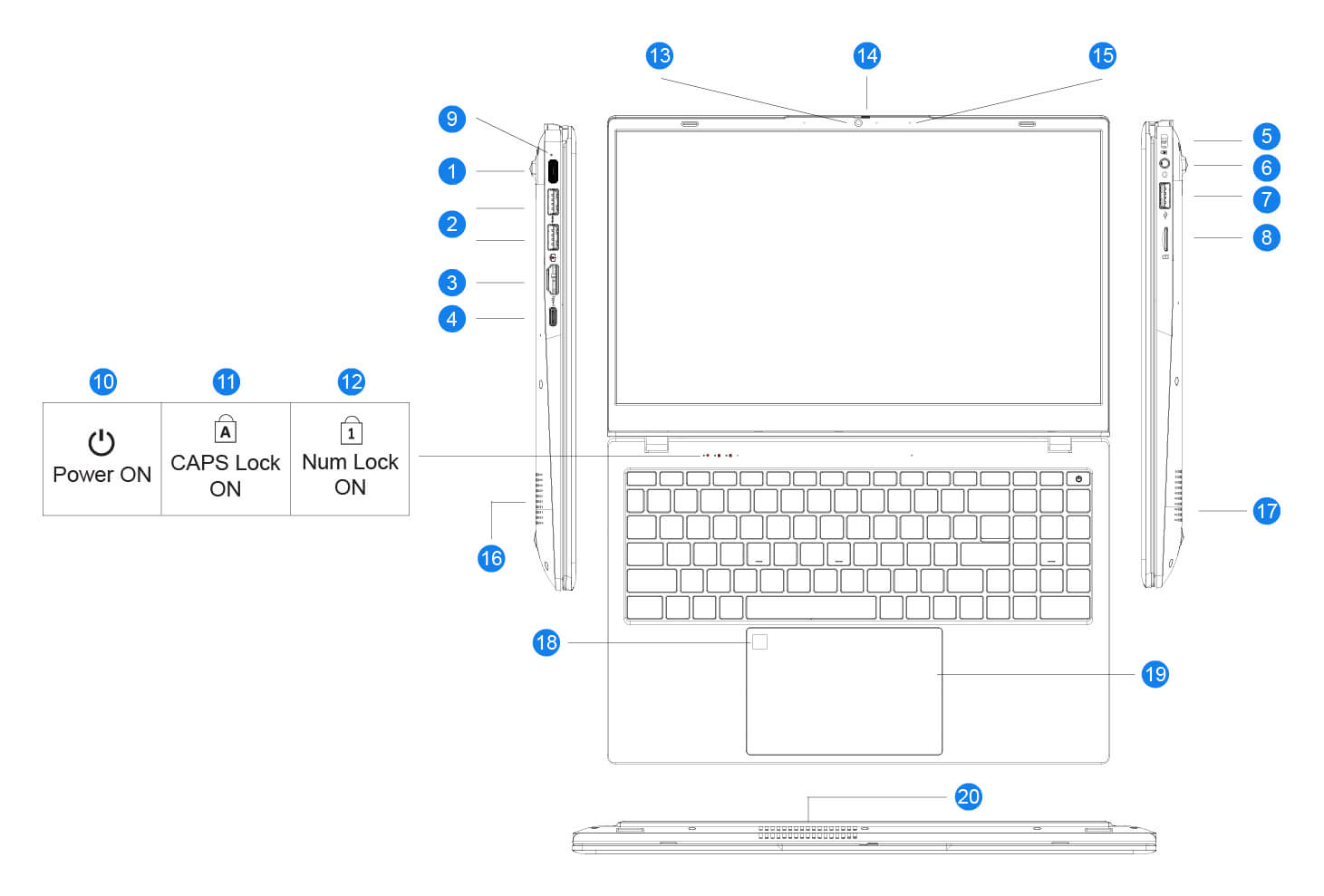
Ports
1. USB Type-C Power Adapter port: Used for powering and charging your Palbook with the included 65W USB-C Power Adapter.
2. USB 3.2 Gen1 Type-A ports: Two high-speed USB ports for connecting peripherals like external drives, mice, and keyboards.
3. HDMI Port: Allows you to connect your Palbook to an external display or projector for presentations or extended screen space.
4. USB Type-C (Power and Data) port: A versatile port for power delivery, data transfer, and connecting external devices.
5. Kensington Lock Slot: Provides a secure way to physically lock your Palbook to a stationary object for added security.
6. Audio Jack: A 3.5mm port for connecting headphones or external speakers.
7. USB 2.0 Type-A port: A standard USB port for connecting a variety of peripherals.
8. MicroSD Card Slot: Allows you to expand your storage or transfer data from your MicroSD cards.
LED Indicators
9. Power: The Power LED Indicator shows when the Power Adapter is connected to your Palbook. When illuminated RED, it means your Palbook is charging. When illuminated BLUE, it means your Palbook is fully charged and Plugged-in.
10. Power ON: This means your Palbook is powered on.
11. CAPS Lock ON: This means your Palbook has CAPS Lock enabled, thus your alphabets will appear in capital letters.
12. Num Lock ON: This means your Palbook has Number Lock enabled, thus you can make use of the numeric keypad.
Components
13. HD+ Webcam: Captures high-definition video for clear video calls and recordings.
14. Privacy Shutter Switch: Physically covers the webcam for added privacy. To c
15. Microphone: Captures your voice for calls and recordings.
16. Dual Speaker: Delivers clear and balanced audio output.
17. Dual Speaker: Delivers clear and balanced audio output.
18. Fingerprint Reader: Provides secure and quick login access using your finger.
19. Multi-Gesture Touchpad: Supports various touch gestures for easy navigation.
20. Heat Vent: Expels heat to keep the laptop cool during use.
Was this article helpful?
That’s Great!
Thank you for your feedback
Sorry! We couldn't be helpful
Thank you for your feedback
Feedback sent
We appreciate your effort and will try to fix the article